How to configure Source Link in .NET projects and how to use into the Visual Studio
As a maintainer of open-source projects at Xabaril, I think it is important to help developers debug the source code of the libraries they use. It makes troubleshooting easier and helps them understand how those libraries work. That is why we decided to enable Source Link in our projects.
Before we begin, I would like to thank Unai Zorrilla for showing me how Source Link works and helping me configure it in Balea.
Example environment
This guide uses .NET Core 3.1 and Visual Studio 2019.
What is Source Link
Source Link lets developers debug the source code of NuGet packages. Tools such as Visual Studio can use it to step into that code as if it were another local project, making it easier to troubleshoot problems when working with open-source libraries.
Configure Source Link in .NET Core projects
Centralize dependency versions
The dependencies.props file lets you define NuGet package versions in one place. This avoids version inconsistencies across a solution, while each project declares the dependencies it needs.
<PropertyGroup Label="Package Dependencies">
<AspNetCoreVersion>3.1.3</AspNetCoreVersion>
<EntityFrameworkVersion>3.1.3</EntityFrameworkVersion>
</PropertyGroup>
In your csproj file, declare the dependencies you want to use:
<ItemGroup>
<PackageReference Include="Microsoft.Extensions.Http.Polly" Version="$(AspNetCoreVersion)" />
</ItemGroup>
If the ASP.NET Core team releases a new version, you do not need to update every project individually. Update the version in dependencies.props, and the projects that reference it will use that version.
Share solution metadata
Directory.Build.props is another useful file: it lets you share common metadata across the solution.
<Project>
<Import Project="build/dependencies.props" />
<PropertyGroup Label="Package information">
<PackageLicenseExpression>Apache-2.0</PackageLicenseExpression>
<PackageProjectUrl>http://github.com/xabaril/Balea</PackageProjectUrl>
<RepositoryUrl>https://github.com/xabaril/Balea</RepositoryUrl>
<Authors>Xabaril Contributors</Authors>
<Company>Xabaril</Company>
</PropertyGroup>
</Project>
The first line imports dependencies.props. The remaining properties define metadata shared by all projects, including the license and project URL.
Enable Source Link
To enable Source Link in your project, add these properties to Directory.Build.props:
<!-- Publish the repository URL in the built .nupkg (in the NuSpec <Repository> element) -->
<PublishRepositoryUrl>true</PublishRepositoryUrl>
<!-- Embed source files that are not tracked by the source control manager in the PDB -->
<EmbedUntrackedSources>true</EmbedUntrackedSources>
<!-- Build symbol package (.snupkg) to distribute the PDB containing Source Link -->
<IncludeSymbols>true</IncludeSymbols>
<SymbolPackageFormat>snupkg</SymbolPackageFormat>
For projects hosted on GitHub, reference the Source Link package:
<ItemGroup>
<SourceRoot Include="$(MSBuildThisFileDirectory)/"/>
<PackageReference Include="Microsoft.SourceLink.GitHub" Version="$(MicrosoftSourceLinkGithub)">
<PrivateAssets>all</PrivateAssets>
<IncludeAssets>runtime; build; native; contentfiles; analyzers</IncludeAssets>
</PackageReference>
</ItemGroup>
Enable deterministic builds
Next, enable deterministic builds. In this repository, Claire Novotny explains how they work and why they matter.
Deterministic builds make it possible to verify which source produced a binary and trace it back to that source.
Add the following to Directory.Build.props if you use GitHub Actions:
<PropertyGroup Condition="'$(GITHUB_ACTIONS)' == 'true'">
<ContinuousIntegrationBuild>true</ContinuousIntegrationBuild>
</PropertyGroup>
Apply the workaround for SDKs earlier than 3.1.300
There is a known issue with the EmbedUntrackedSources attribute in SDKs earlier than 3.1.300. The original article used SDK 3.1.201.
For that environment, add a Directory.Build.targets file at solution level with the following content:
<Project>
<PropertyGroup>
<TargetFrameworkMonikerAssemblyAttributesPath>$([System.IO.Path]::Combine('$(IntermediateOutputPath)','$(TargetFrameworkMoniker).AssemblyAttributes$(DefaultLanguageSourceExtension)'))</TargetFrameworkMonikerAssemblyAttributesPath>
</PropertyGroup>
<ItemGroup>
<!-- https://github.com/dotnet/sourcelink/issues/572 -->
<EmbeddedFiles Include="$(GeneratedAssemblyInfoFile)"/>
</ItemGroup>
</Project>
Check the NuGet package
Test the package locally
To test your packages locally before publishing them to a NuGet feed, temporarily remove the MSBuild condition for GitHub Actions:
<PropertyGroup>
<ContinuousIntegrationBuild>true</ContinuousIntegrationBuild>
</PropertyGroup>
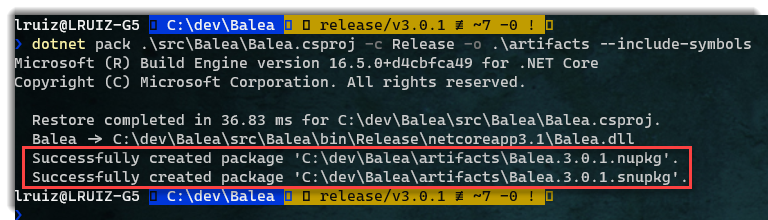
Run the following command to pack your project:
dotnet pack <yoor_project>.csproj -c Release -o .\artifacts --include-symbols
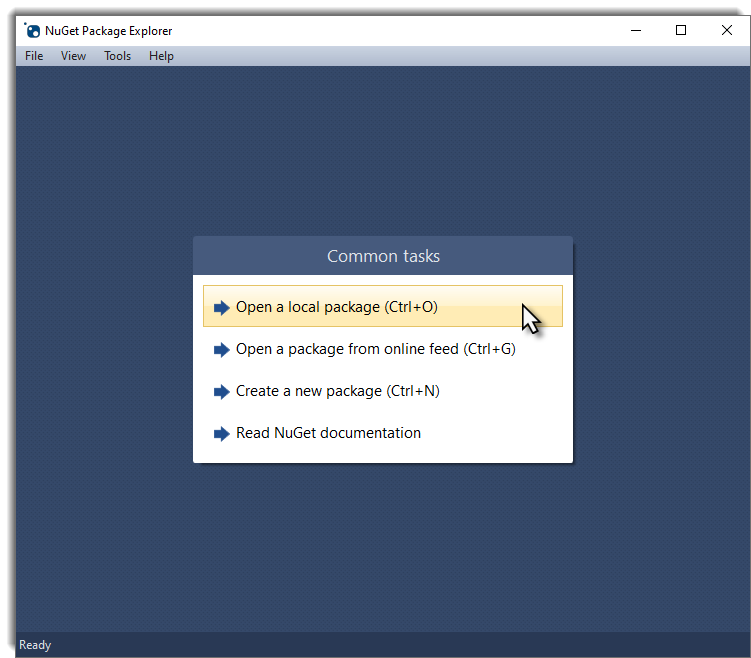
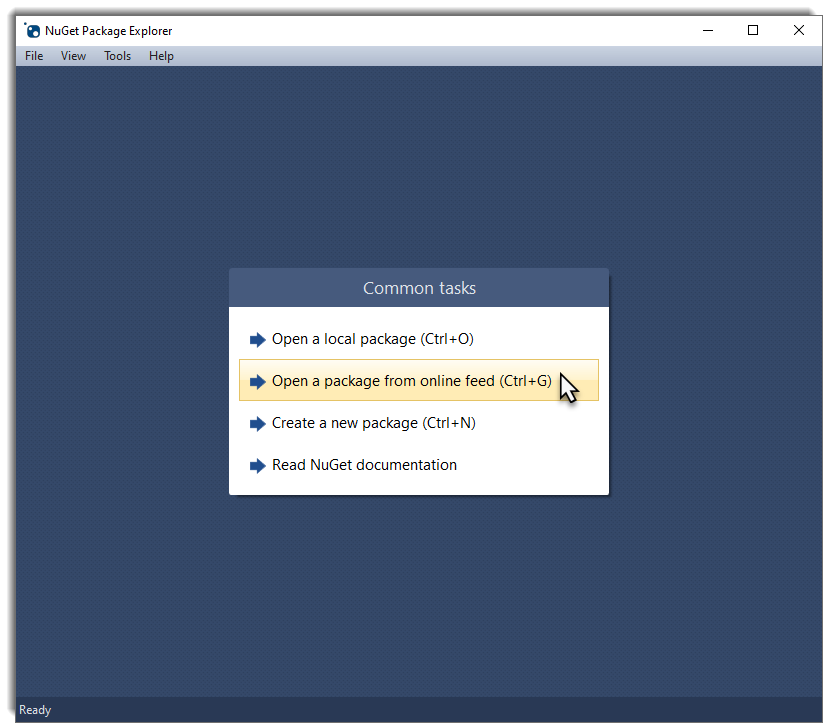
Open NuGet Package Explorer and select Open a local package.
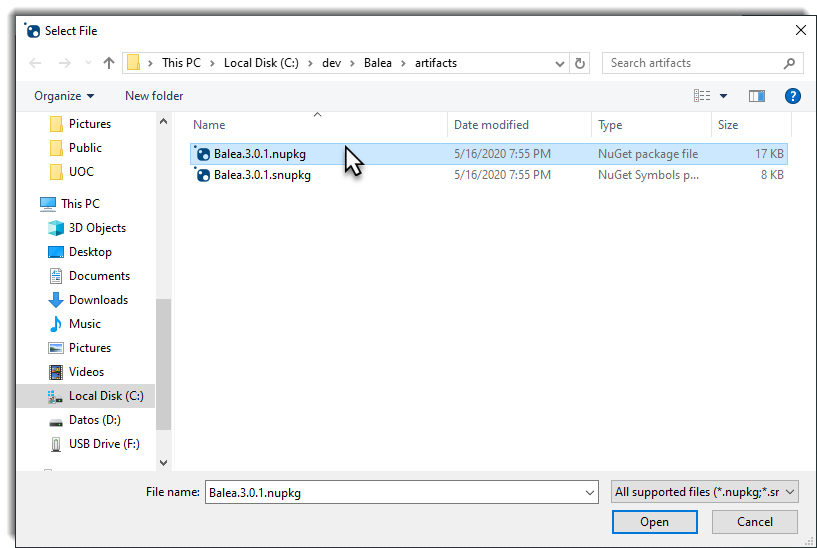
Find the NuGet package you just generated.
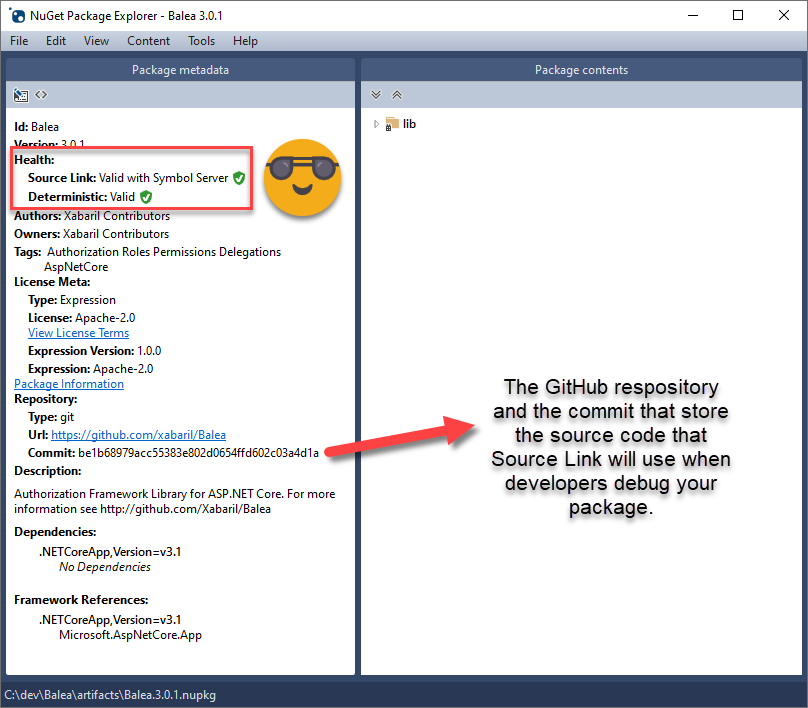
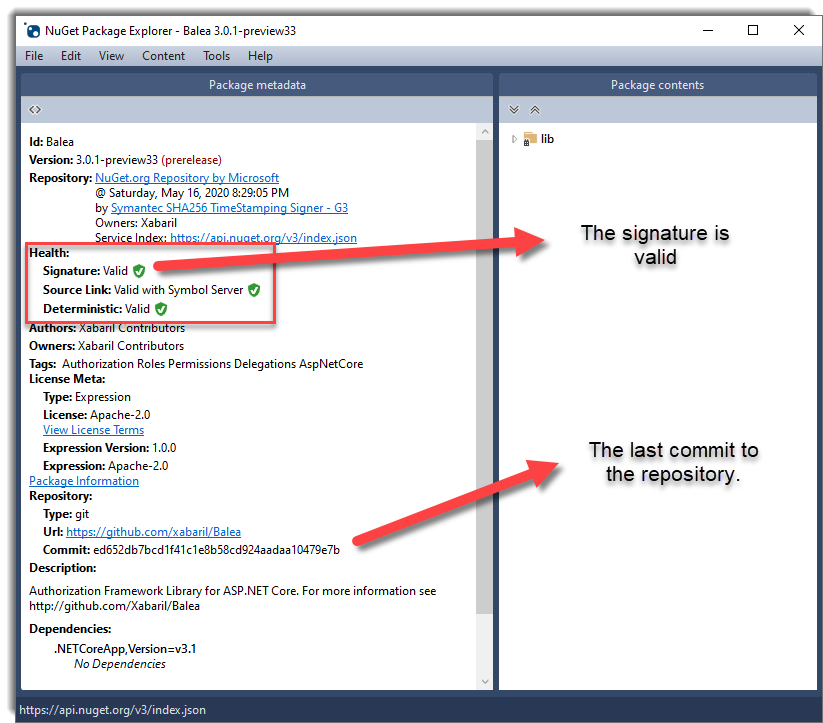
You should see that Source Link and the deterministic build are valid.
Validate the published package
Before pushing your changes, restore the GitHub Actions condition you removed for local testing. You will need a GitHub Action to publish your packages to the NuGet feed.
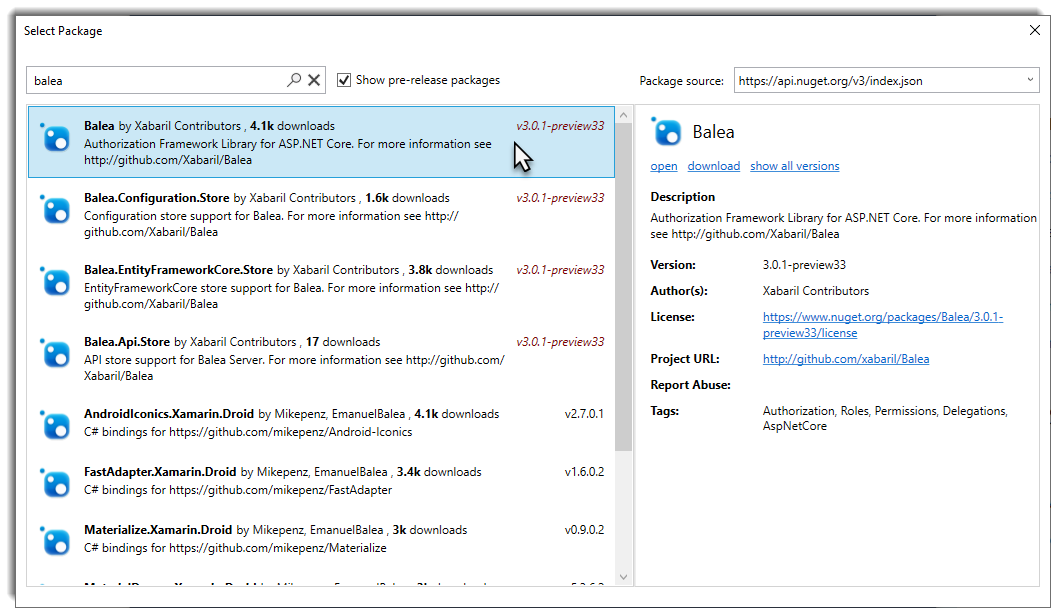
Once the package is published, open NuGet Package Explorer again and select Open a package from online feed.
Search for your NuGet package.
If you followed the steps correctly, the package should be valid and reflect the latest commit in your repository.
Configure Visual Studio 2019 for Source Link
Enable the NuGet symbol server
The NuGet symbol server is disabled by default. Visual Studio 2019 needs to download those symbols to work with Source Link. To enable it, go to Tools → Options → Debugging → Symbols.
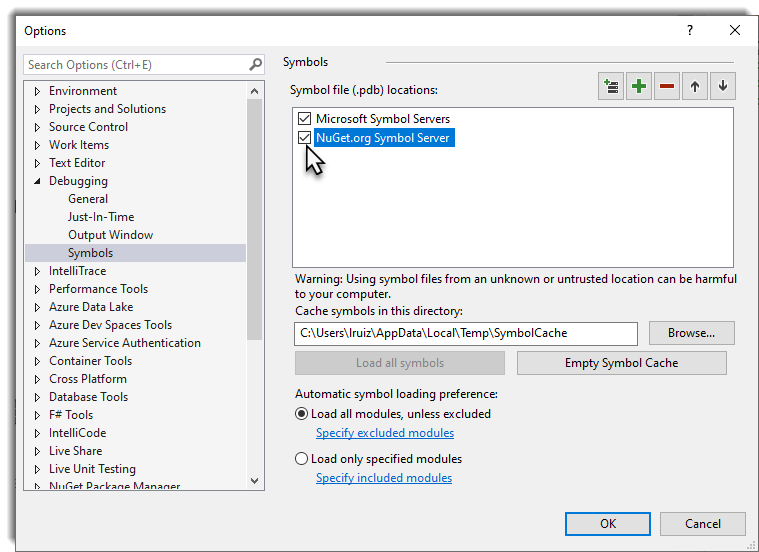
Disable Just My Code
Go to Tools → Options → Debugging → General and clear Enable Just My Code.
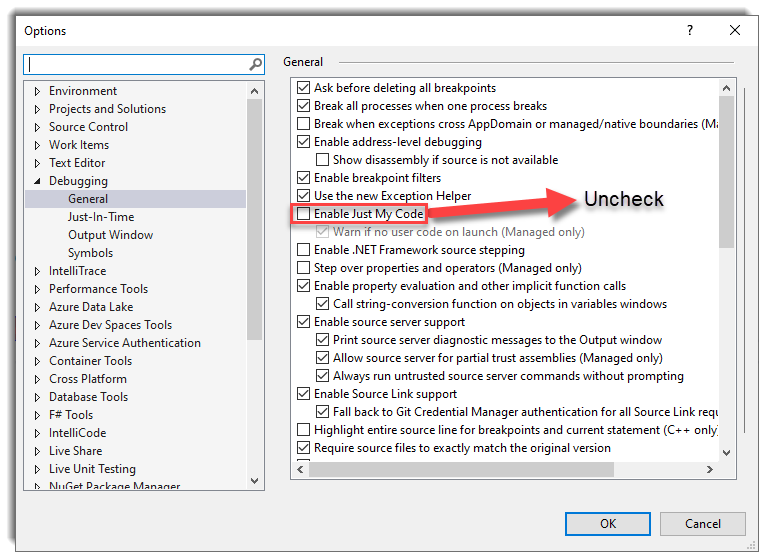
Review the Source Link options
Source Link is enabled by default in Visual Studio 2019, but Source Server support is not.
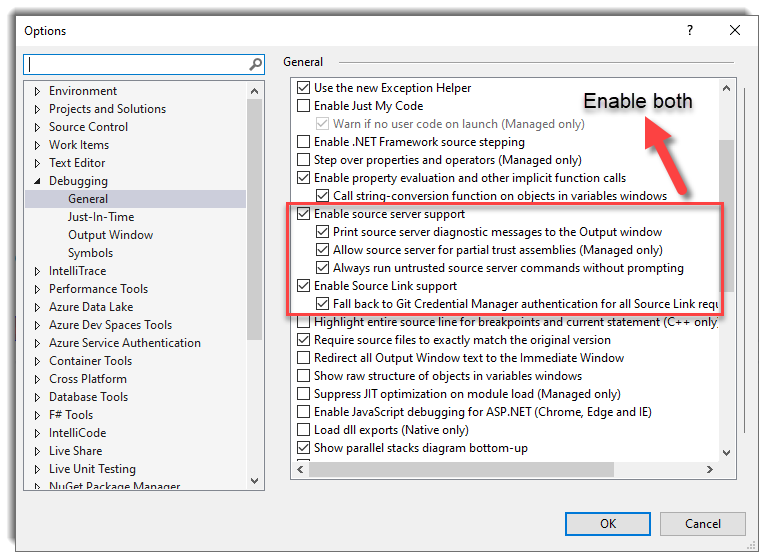
The Fallback to Git Credential Manager option lets tools that use Git Credential Manager work with Source Link in private repositories.
Debug library source code
For this example, I created a simple Web API application and added the Balea packages.
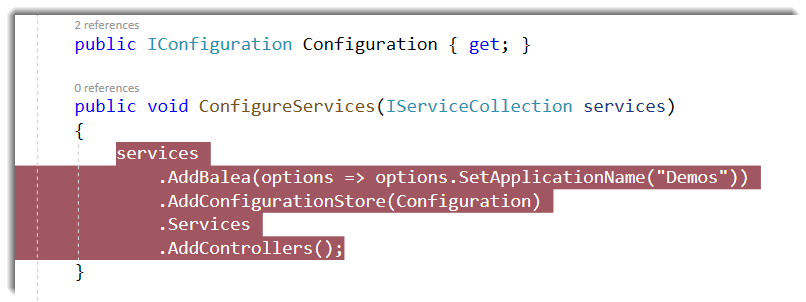
Run the web application and press F11 to step into the library code.
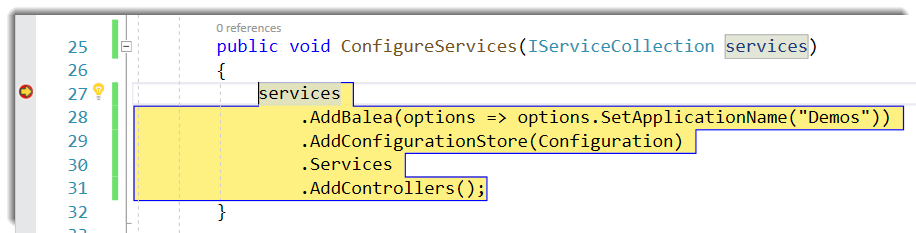
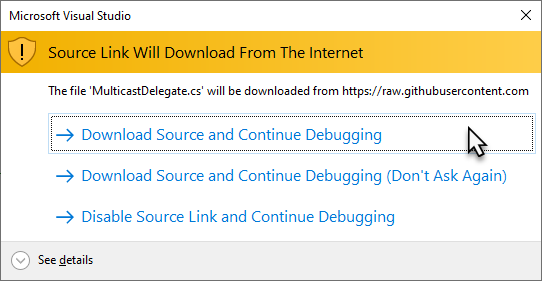
The first time you do this, a dialog will explain that Source Link is about to download source code from the Internet, if it has not already been downloaded.
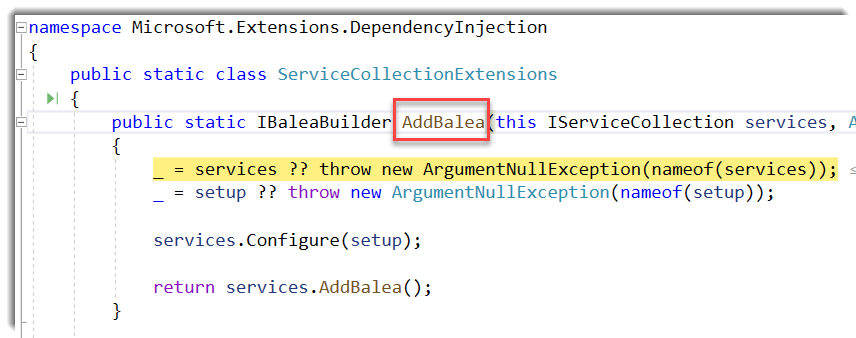
Once Source Link has downloaded the source code, you can debug it in Visual Studio.
This guide shows how to configure Source Link in .NET projects and use it in Visual Studio. For a complete example, see the Balea repository.
Original reference article: Using Source Link in .NET projects and how to configure Visual Studio to use it.
Configuration ACCEPT Reject all
Privacy Overview
More information in the Cookies Policy.
| Cookie | Duration | Description |
|---|---|---|
| __cfduid | 1 year | The cookie is used by cdn services like CloudFare to identify individual clients behind a shared IP address and apply security settings on a per-client basis. It does not correspond to any user ID in the web application and does not store any personally identifiable information. |
| __cfduid | 29 days 23 hours 59 minutes | The cookie is used by cdn services like CloudFare to identify individual clients behind a shared IP address and apply security settings on a per-client basis. It does not correspond to any user ID in the web application and does not store any personally identifiable information. |
| __cfduid | 1 year | The cookie is used by cdn services like CloudFare to identify individual clients behind a shared IP address and apply security settings on a per-client basis. It does not correspond to any user ID in the web application and does not store any personally identifiable information. |
| __cfduid | 29 days 23 hours 59 minutes | The cookie is used by cdn services like CloudFare to identify individual clients behind a shared IP address and apply security settings on a per-client basis. It does not correspond to any user ID in the web application and does not store any personally identifiable information. |
| _ga | 1 year | This cookie is installed by Google Analytics. The cookie is used to calculate visitor, session, campaign data and keep track of site usage for the site's analytics report. The cookies store information anonymously and assign a randomly generated number to identify unique visitors. |
| _ga | 1 year | This cookie is installed by Google Analytics. The cookie is used to calculate visitor, session, campaign data and keep track of site usage for the site's analytics report. The cookies store information anonymously and assign a randomly generated number to identify unique visitors. |
| _ga | 1 year | This cookie is installed by Google Analytics. The cookie is used to calculate visitor, session, campaign data and keep track of site usage for the site's analytics report. The cookies store information anonymously and assign a randomly generated number to identify unique visitors. |
| _ga | 1 year | This cookie is installed by Google Analytics. The cookie is used to calculate visitor, session, campaign data and keep track of site usage for the site's analytics report. The cookies store information anonymously and assign a randomly generated number to identify unique visitors. |
| _gat_UA-326213-2 | 1 year | No description |
| _gat_UA-326213-2 | 1 year | No description |
| _gat_UA-326213-2 | 1 year | No description |
| _gat_UA-326213-2 | 1 year | No description |
| _gid | 1 year | This cookie is installed by Google Analytics. The cookie is used to store information of how visitors use a website and helps in creating an analytics report of how the wbsite is doing. The data collected including the number visitors, the source where they have come from, and the pages viisted in an anonymous form. |
| _gid | 1 year | This cookie is installed by Google Analytics. The cookie is used to store information of how visitors use a website and helps in creating an analytics report of how the wbsite is doing. The data collected including the number visitors, the source where they have come from, and the pages viisted in an anonymous form. |
| _gid | 1 year | This cookie is installed by Google Analytics. The cookie is used to store information of how visitors use a website and helps in creating an analytics report of how the wbsite is doing. The data collected including the number visitors, the source where they have come from, and the pages viisted in an anonymous form. |
| _gid | 1 year | This cookie is installed by Google Analytics. The cookie is used to store information of how visitors use a website and helps in creating an analytics report of how the wbsite is doing. The data collected including the number visitors, the source where they have come from, and the pages viisted in an anonymous form. |
| attributionCookie | session | No description |
| cookielawinfo-checkbox-analytics | 1 year | Set by the GDPR Cookie Consent plugin, this cookie is used to record the user consent for the cookies in the "Analytics" category . |
| cookielawinfo-checkbox-necessary | 1 year | This cookie is set by GDPR Cookie Consent plugin. The cookies is used to store the user consent for the cookies in the category "Necessary". |
| cookielawinfo-checkbox-necessary | 11 months | This cookie is set by GDPR Cookie Consent plugin. The cookies is used to store the user consent for the cookies in the category "Necessary". |
| cookielawinfo-checkbox-necessary | 11 months | This cookie is set by GDPR Cookie Consent plugin. The cookies is used to store the user consent for the cookies in the category "Necessary". |
| cookielawinfo-checkbox-necessary | 1 year | This cookie is set by GDPR Cookie Consent plugin. The cookies is used to store the user consent for the cookies in the category "Necessary". |
| cookielawinfo-checkbox-non-necessary | 11 months | This cookie is set by GDPR Cookie Consent plugin. The cookies is used to store the user consent for the cookies in the category "Non Necessary". |
| cookielawinfo-checkbox-non-necessary | 11 months | This cookie is set by GDPR Cookie Consent plugin. The cookies is used to store the user consent for the cookies in the category "Non Necessary". |
| cookielawinfo-checkbox-non-necessary | 11 months | This cookie is set by GDPR Cookie Consent plugin. The cookies is used to store the user consent for the cookies in the category "Non Necessary". |
| cookielawinfo-checkbox-non-necessary | 1 year | This cookie is set by GDPR Cookie Consent plugin. The cookies is used to store the user consent for the cookies in the category "Non Necessary". |
| cookielawinfo-checkbox-performance | 1 year | Set by the GDPR Cookie Consent plugin, this cookie is used to store the user consent for cookies in the category "Performance". |
| cppro-ft | 1 year | No description |
| cppro-ft | 7 years 1 months 12 days 23 hours 59 minutes | No description |
| cppro-ft | 7 years 1 months 12 days 23 hours 59 minutes | No description |
| cppro-ft | 1 year | No description |
| cppro-ft-style | 1 year | No description |
| cppro-ft-style | 1 year | No description |
| cppro-ft-style | session | No description |
| cppro-ft-style | session | No description |
| cppro-ft-style-temp | 23 hours 59 minutes | No description |
| cppro-ft-style-temp | 23 hours 59 minutes | No description |
| cppro-ft-style-temp | 23 hours 59 minutes | No description |
| cppro-ft-style-temp | 1 year | No description |
| i18n | 10 years | No description available. |
| IE-jwt | 62 years 6 months 9 days 9 hours | No description |
| IE-LANG_CODE | 62 years 6 months 9 days 9 hours | No description |
| IE-set_country | 62 years 6 months 9 days 9 hours | No description |
| JSESSIONID | session | The JSESSIONID cookie is used by New Relic to store a session identifier so that New Relic can monitor session counts for an application. |
| viewed_cookie_policy | 11 months | The cookie is set by the GDPR Cookie Consent plugin and is used to store whether or not user has consented to the use of cookies. It does not store any personal data. |
| viewed_cookie_policy | 1 year | The cookie is set by the GDPR Cookie Consent plugin and is used to store whether or not user has consented to the use of cookies. It does not store any personal data. |
| viewed_cookie_policy | 1 year | The cookie is set by the GDPR Cookie Consent plugin and is used to store whether or not user has consented to the use of cookies. It does not store any personal data. |
| viewed_cookie_policy | 11 months | The cookie is set by the GDPR Cookie Consent plugin and is used to store whether or not user has consented to the use of cookies. It does not store any personal data. |
| VISITOR_INFO1_LIVE | 5 months 27 days | A cookie set by YouTube to measure bandwidth that determines whether the user gets the new or old player interface. |
| wmc | 9 years 11 months 30 days 11 hours 59 minutes | No description |
| Cookie | Duration | Description |
|---|---|---|
| __cf_bm | 30 minutes | This cookie, set by Cloudflare, is used to support Cloudflare Bot Management. |
| sp_landing | 1 day | The sp_landing is set by Spotify to implement audio content from Spotify on the website and also registers information on user interaction related to the audio content. |
| sp_t | 1 year | The sp_t cookie is set by Spotify to implement audio content from Spotify on the website and also registers information on user interaction related to the audio content. |
| Cookie | Duration | Description |
|---|---|---|
| _hjAbsoluteSessionInProgress | 1 year | No description |
| _hjAbsoluteSessionInProgress | 1 year | No description |
| _hjAbsoluteSessionInProgress | 1 year | No description |
| _hjAbsoluteSessionInProgress | 1 year | No description |
| _hjFirstSeen | 29 minutes | No description |
| _hjFirstSeen | 29 minutes | No description |
| _hjFirstSeen | 29 minutes | No description |
| _hjFirstSeen | 1 year | No description |
| _hjid | 11 months 29 days 23 hours 59 minutes | This cookie is set by Hotjar. This cookie is set when the customer first lands on a page with the Hotjar script. It is used to persist the random user ID, unique to that site on the browser. This ensures that behavior in subsequent visits to the same site will be attributed to the same user ID. |
| _hjid | 11 months 29 days 23 hours 59 minutes | This cookie is set by Hotjar. This cookie is set when the customer first lands on a page with the Hotjar script. It is used to persist the random user ID, unique to that site on the browser. This ensures that behavior in subsequent visits to the same site will be attributed to the same user ID. |
| _hjid | 1 year | This cookie is set by Hotjar. This cookie is set when the customer first lands on a page with the Hotjar script. It is used to persist the random user ID, unique to that site on the browser. This ensures that behavior in subsequent visits to the same site will be attributed to the same user ID. |
| _hjid | 1 year | This cookie is set by Hotjar. This cookie is set when the customer first lands on a page with the Hotjar script. It is used to persist the random user ID, unique to that site on the browser. This ensures that behavior in subsequent visits to the same site will be attributed to the same user ID. |
| _hjIncludedInPageviewSample | 1 year | No description |
| _hjIncludedInPageviewSample | 1 year | No description |
| _hjIncludedInPageviewSample | 1 year | No description |
| _hjIncludedInPageviewSample | 1 year | No description |
| _hjSession_1776154 | session | No description |
| _hjSessionUser_1776154 | session | No description |
| _hjTLDTest | 1 year | No description |
| _hjTLDTest | 1 year | No description |
| _hjTLDTest | session | No description |
| _hjTLDTest | session | No description |
| _lfa_test_cookie_stored | past | No description |
| Cookie | Duration | Description |
|---|---|---|
| loglevel | never | No description available. |
| prism_90878714 | 1 month | No description |
| redirectFacebook | 2 minutes | No description |
| YSC | session | YSC cookie is set by Youtube and is used to track the views of embedded videos on Youtube pages. |
| yt-remote-connected-devices | never | YouTube sets this cookie to store the video preferences of the user using embedded YouTube video. |
| yt-remote-device-id | never | YouTube sets this cookie to store the video preferences of the user using embedded YouTube video. |
| yt.innertube::nextId | never | This cookie, set by YouTube, registers a unique ID to store data on what videos from YouTube the user has seen. |
| yt.innertube::requests | never | This cookie, set by YouTube, registers a unique ID to store data on what videos from YouTube the user has seen. |