


Ramos Refusta
Research Engineer – Plain Concepts


Overview
At the Plain Concepts Research team, we have spent several months evaluating the performance of a real-time conversational avatar system, with the goal of identifying the most suitable configuration for a production environment. Throughout this research, we analyzed different conversational AI models and hardware configurations, measuring metrics such as latency, response stability, and overall system performance. The results have allowed us to identify which components have the greatest impact on user experience and which combination offers the best balance between performance and consistency.

The goal of the project is to develop a conversational avatar capable of engaging in real-time voice interaction with users. The avatar listens, interprets the request using a language model and responds with both voice and synchronized facial animations, aiming to deliver the most natural conversation possible. To achieve this we needed to coordinate voice processing, artificial intelligence, facial animation and rendering, while minimizing the total latency of the system.
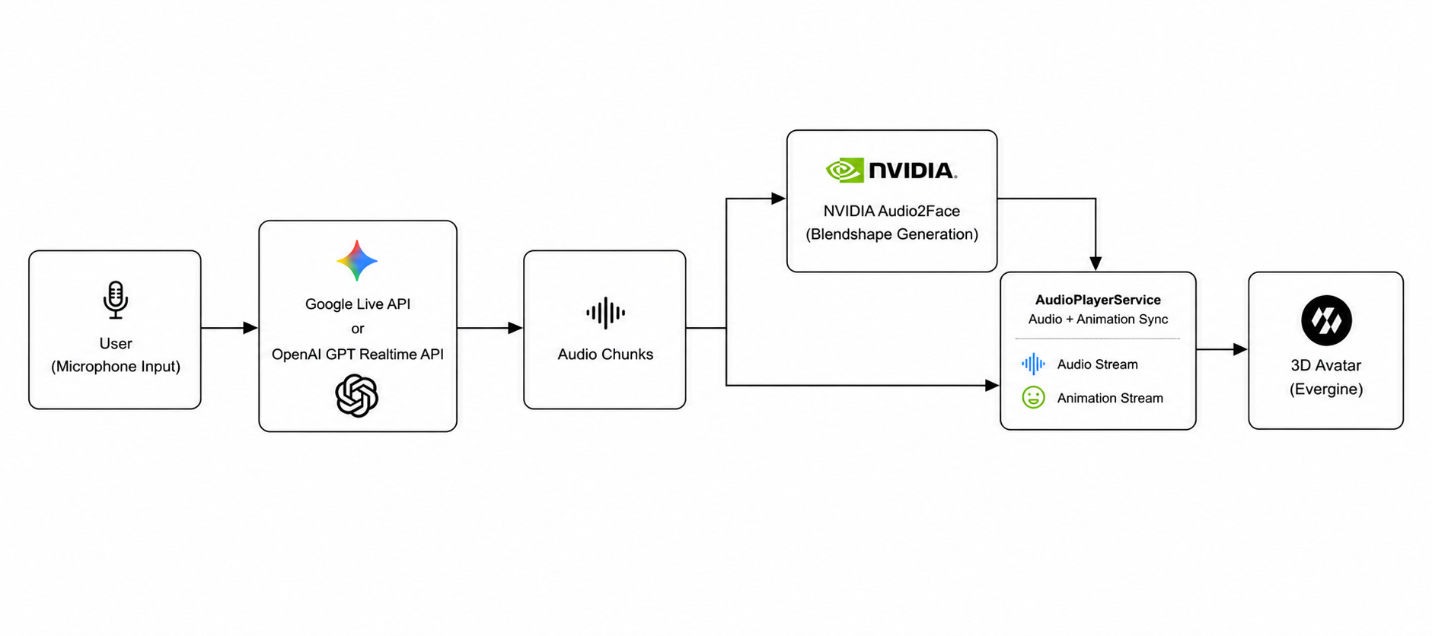
The pipeline used during testing follows this sequence: the user speaks and a Voice Activity Detection (VAD) system detects the end of their turn. The LLM (in this case Gemini 3.1 Live or a GPT Realtime model) then generates an audio response. Those audio chunks are simultaneously sent to NVIDIA Audio2Face, which generates the facial animations (blendshapes), and to the audio playback service, which waits until it has both audio and animation before playing them back in sync. Finally, the result is rendered on the avatar using the Evergine graphics engine.
For the interaction to feel natural, the total time elapsed from when the user stops speaking to when the avatar begins speaking and animating must be as short and predictable as possible. In fact, from a user experience standpoint, unpredictable latency spikes are more noticeable and disruptive than a slightly higher but stable latency.
Part I. LLM provider comparison
To identify the most suitable provider for a production environment, we compared the performance of the leading language models with real-time conversation capabilities. Our interest was not only to find out which one responded fastest, but also which one offered the most stable and predictable latency, a fundamental factor for making the avatar interaction feel natural.
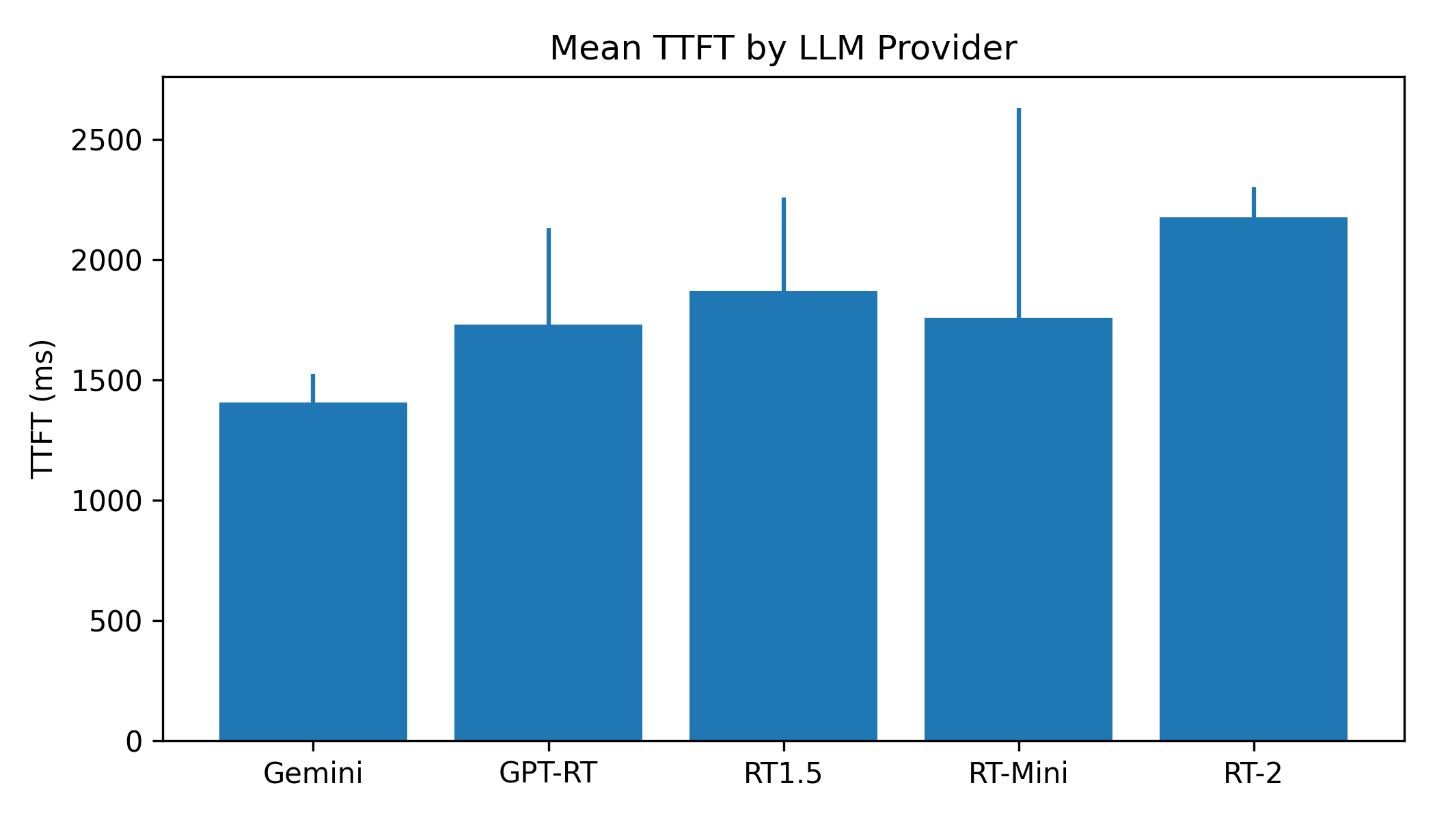
To do this we measured the TTFT (Time To First Token) of each evaluated provider, the time elapsed from when the client VAD detects the end of the user turn to when the first byte of audio generated by the model arrives. The methodology was identical for all providers: the same VAD, the same silence_duration_ms value (200 ms) and the same bank of 20 questions organized by difficulty level.
What is TTFT and why does it matter
TTFT stands for “Time To First Token” or, in the audio context, the time to the first audio byte. It is the interval from when the user stops speaking until the first audio chunk of the language model response arrives. It does not include Audio2Face or the playback buffer: it is purely the LLM “thinking” time.
The lower the TTFT, the sooner the audio can start being processed. And the more stable it is (lower standard deviation), the more predictable the user experience.
Another common metric in model evaluation is TPOT (Time Per Output Token), but this study did not measure it because in this scenario it does not provide relevant information for the user experience. Once the first audio chunk is received, the bottleneck shifts to Audio2Face, which has enough time to process subsequent chunks as they continue to arrive. Therefore, TTFT is the metric that best represents the perceived responsiveness of the system.
Methodology
All providers were measured under the same conditions to ensure results are comparable:
Each of the 20 questions was executed once per provider, recording the TTFT obtained. Aggregate metrics (mean, standard deviation, minimum and maximum) were calculated from the set of 20 measurements per model.
Questions were classified based on the expected reasoning effort from the model. Easy questions correspond to greetings or simple general knowledge; medium questions require brief explanations; complex questions involve reasoning or recommendation elaboration; and very complex questions demand extensive responses with planning, comparison or detailed concept explanation. The full list can be found in the appendix.
| Provider | Mean | Std. Dev. | Min. | Max. |
| Gemini 3.1 Live | 1.407 ms | ±118 ms | 1.191 ms | 1.626 ms |
| GPT-Realtime | 1.731 ms | ±399 ms | 834 ms | 2.783 ms |
| GPT-Realtime 1.5 | 1.869 ms | ±389 ms | 1.263 ms | 2.857 ms |
| GPT-Realtime-Mini | 1.758 ms | ±872 ms | 1.045 ms | 4.446 ms |
| GPT-Realtime-2 | 2.232 |
Latency by difficulty level
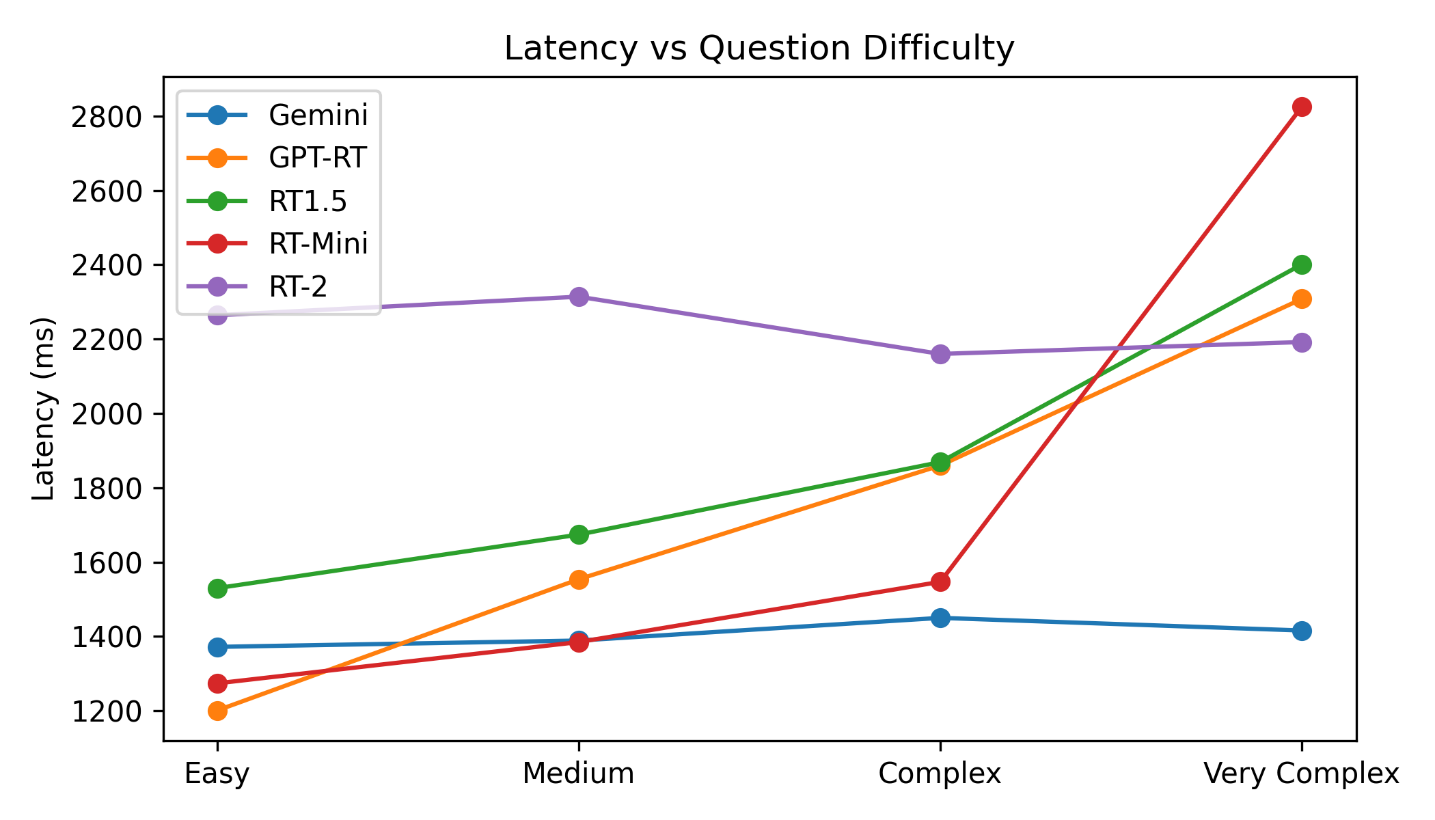
The most significant finding is each model behavior as complexity increases. Gemini 3.1 Live maintains a nearly constant latency (~1,400 ms) regardless of difficulty. GPT models, on the other hand, scale significantly: GPT-Realtime goes from 1,201 ms on easy questions to 2,308 ms on very complex ones.
| Difficulty | Gemini 3.1 Live | GPT-Realtime | GPT-Realtime 1.5 | GPT-Realtime mini | GPT-Realtime 2 |
|---|---|---|---|---|---|
| Easy | 1,372 ms | 1,201 ms | 1,530 ms | 1,274 ms | 2,264 ms |
| Medium | 1,389 ms | 1,554 ms | 1,674 ms | 1,385 ms | 2,314 ms |
| Complex | 1,450 ms | 1,860 ms | 1,869 ms | 1,547 ms | 2,160 ms |
| Very complex | 1,416 ms | 2,308 ms | 2,401 ms | 2,825 ms | 2,192 ms |
Note: GPT-Realtime was deployed in the Azure Sweden Central region, while Gemini 3.1 Live uses Google automatic infrastructure routing. Consequently, some of the observed differences in TTFT may be influenced by network latency between the client and each provider infrastructure.
Key findings
Gemini is the fastest and most consistent. With a mean of 1,407 ms and a standard deviation of only ±118 ms, Gemini 3.1 Live is the most predictable provider. It responds consistently within the same range, regardless of the question asked.
Gemini latency does not scale with complexity. Easy question: 1,372 ms. Very complex question: 1,416 ms. The difference is just 44 ms, essentially statistical noise. This suggests the model is optimized for constant latency, not for spending more time reasoning based on difficulty. During testing, no significant differences in response quality were observed that would justify this constant latency. The most interesting finding is not who is faster, but that Gemini has constant latency regardless of complexity while GPT scales its reasoning time with difficulty.
GPT-Realtime is the fastest on easy questions. On simple questions it reaches 1,201 ms, faster than Gemini. The problem arises with complexity: on very complex questions it scales to 2,308 ms, nearly double.
GPT-Realtime-Mini has severe outliers. Two very complex questions spike its latency to 4,446 ms and 3,781 ms. With a standard deviation of ±872 ms it is the most unpredictable of all, not recommended for production with complex questions.
Response quality. Beyond latency, qualitative differences were observed between models:
These observations are qualitative, based on experience during testing. They are not part of a systematic quality study, but they are relevant to the production decision.
Part II. Hardware comparison for Audio2Face
Once the LLM generates the audio response, that audio must be converted into facial animations: lip movement, cheeks, eyebrows, all in real time. NVIDIA Audio2Face (A2F) is the system that performs this conversion, producing blendshapes, numerical instructions that precisely dictate how much each facial muscle of the avatar moves at any given moment.
Audio2Face is the most computationally expensive component after the LLM. It can run in two ways:
What is an audio chunk
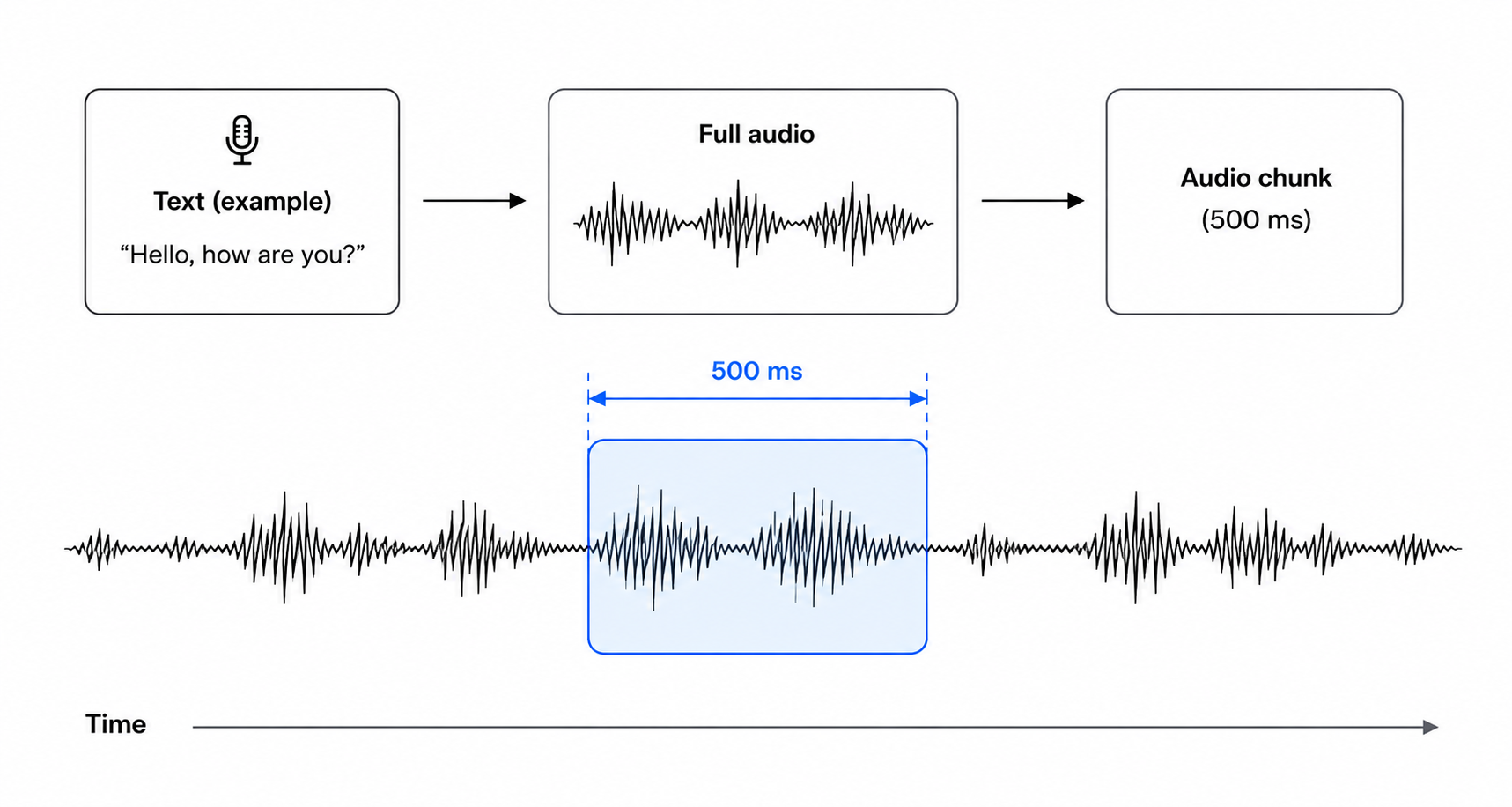
NVIDIA Audio2Face does not process the full audio at once. Instead, it receives it divided into small fragments (chunks) that are sent continuously via gRPC. Each chunk contains a few hundred milliseconds of audio and, as soon as Audio2Face receives one, it begins generating the corresponding facial animations without waiting for the rest of the sentence.
Chunk size represents a trade-off between latency and efficiency: smaller chunks allow avatar animation to start sooner, but increase the number of requests and processing overhead. Larger chunks reduce that overhead but require waiting longer before the animation can begin.
Methodology
| Chunk | RTX 4070 | RTX 4080S | RTX 5090 | A100 (cloud) | 4070 → 5090 | A100 → 5090 |
|---|---|---|---|---|---|---|
| 300 ms | 596 ms | 249 ms | 225 ms | 237 ms | 2.65x | 1.05x |
| 500 ms | 637 ms | 325 ms | 283 ms | 303 ms | 2.25x | 1.07x |
| 750 ms | 1,162 ms | 421 ms | 386 ms | 400 ms | 3.01x | 1.04x |
| 1,000 ms | 1,240 ms | 495 ms | 455 ms | 476 ms | 2.73x | 1.05x |
| 1,500 ms | 1,882 ms | 676 ms | 613 ms | 662 ms | 3.07x | 1.08x |
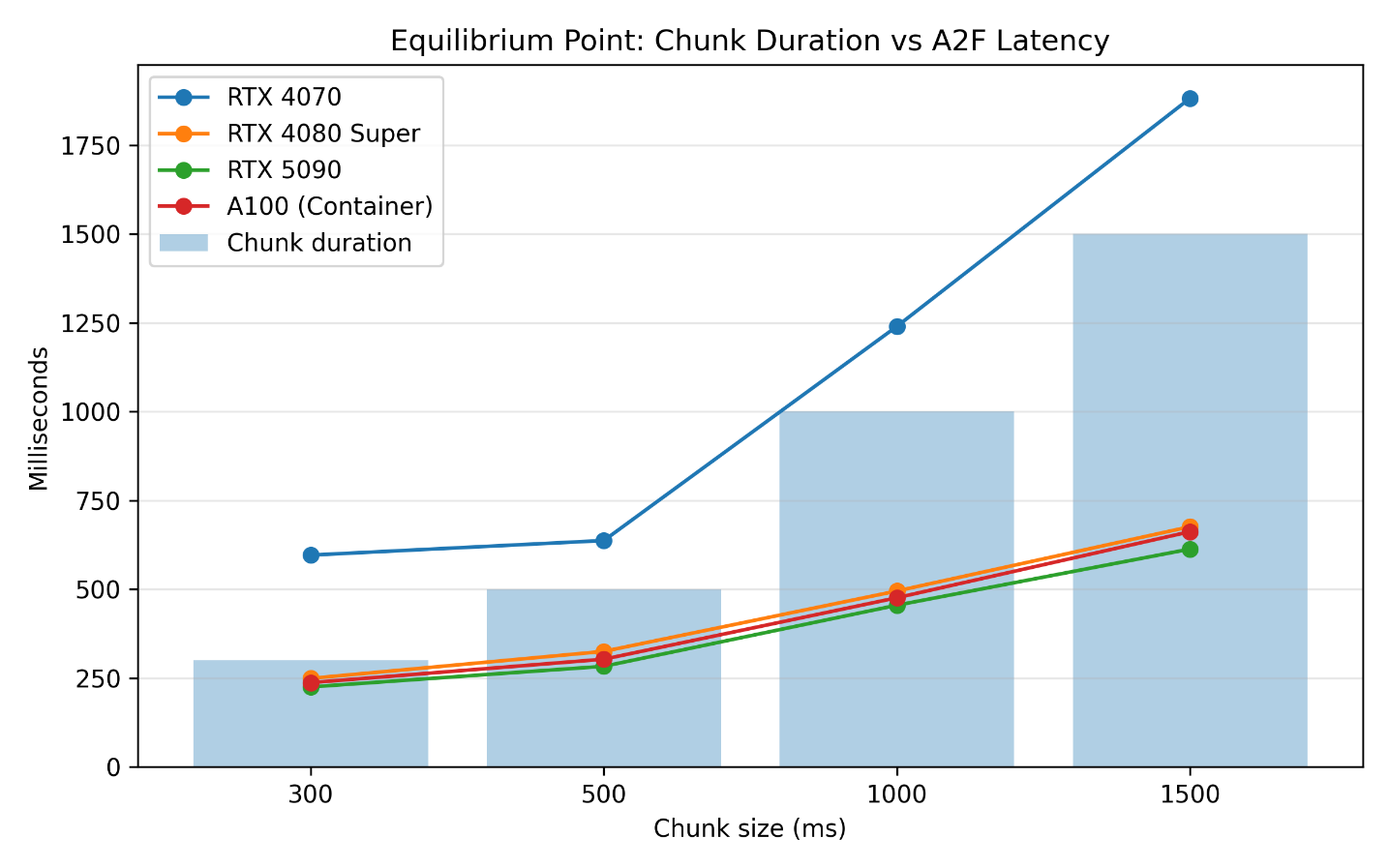
The RTX 5090 achieves the lowest latency across all chunk sizes. However, the difference compared to the RTX 4080 Super is relatively small (24-63 ms in the tests performed), so the impact on total system latency is limited. From a latency standpoint, both GPUs offer very similar behavior.
Regarding the NVIDIA A100 deployed on Azure Container Apps, its performance is also very close to the RTX 5090, with a small additional latency attributable to network communication. This type of deployment is an alternative for architectures where Audio2Face runs centrally. However, this study is limited to latency analysis and does not evaluate aspects such as operational cost or performance under concurrent load.
Part III. Combined LLM + A2F latency analysis
Combining both studies, the total pipeline latency (excluding the playback buffer, which is constant across all configurations) is the sum of the LLM TTFT and the A2F latency.
A2F latency is measured from when an audio chunk is sent via gRPC to when the corresponding blendshapes for the avatar animation are received. In local deployments this is pure processing time, while on the A100 it includes the network round trip.
The A2F values correspond to a 500 ms chunk, which is the practical production value: a good balance between reducing the wait before animation starts and keeping gRPC request overhead at a reasonable level.
| LLM | A2F hardware | TTFT LLM | A2F @500 ms | Total | Std. dev. |
|---|---|---|---|---|---|
| Gemini 3.1 Live | RTX 5090 | 1,407 ms | 283 ms | 1,690 ms | ±120 ms |
| Gemini 3.1 Live | A100 (cloud) | 1,407 ms | 303 ms | 1,710 ms | ±119 ms |
| Gemini 3.1 Live | RTX 4080 Super | 1,407 ms | 325 ms | 1,732 ms | ±120 ms |
| Gemini 3.1 Live | RTX 4070 | 1,407 ms | 637 ms | 2,044 ms | ±122 ms |
| GPT-Realtime | RTX 5090 | 1,731 ms | 283 ms | 2,014 ms | ±401 ms |
| GPT-Realtime-2 | RTX 5090 | 2,176 ms | 283 ms | 2,459 ms | ±128 ms |
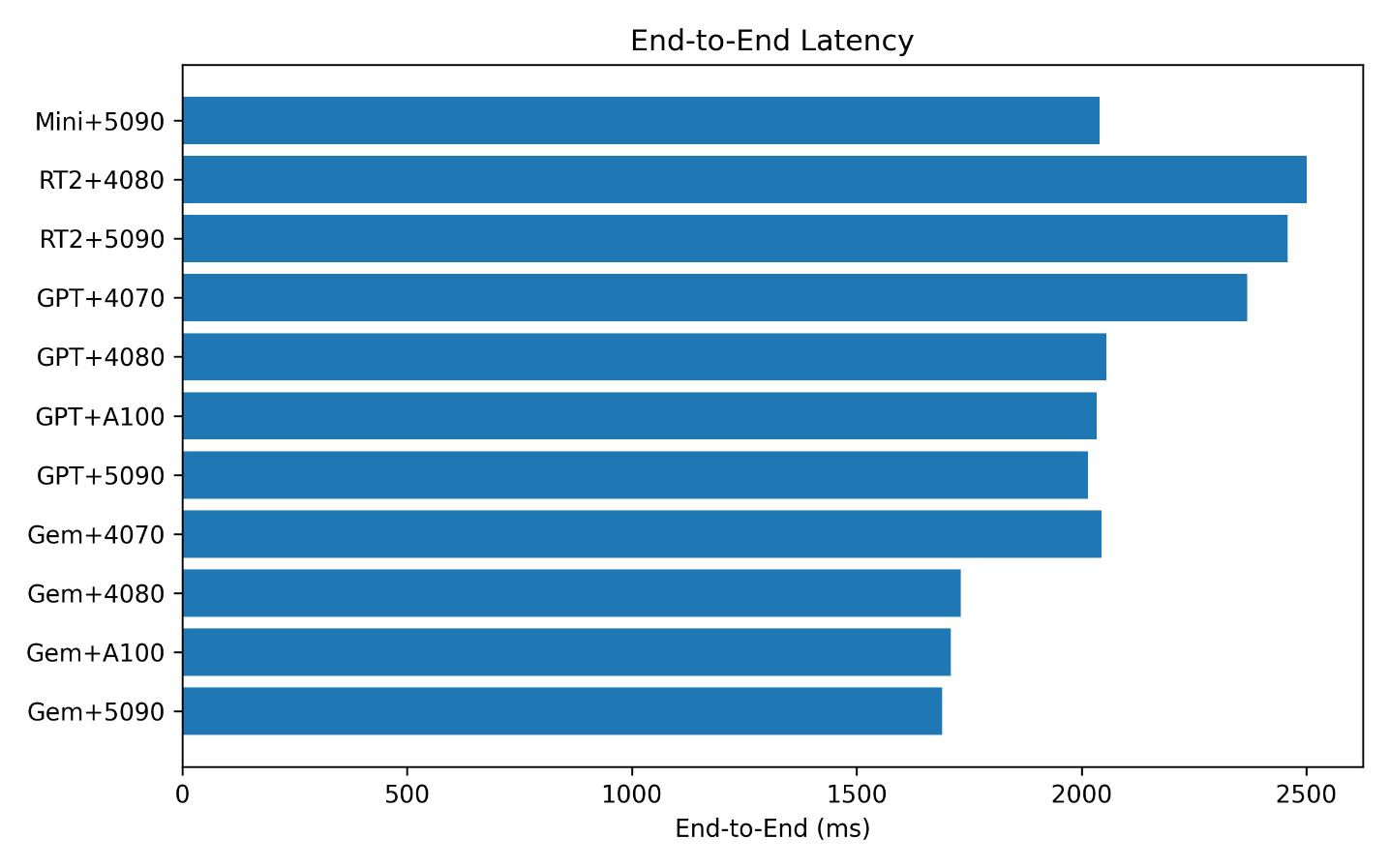
The choice of LLM provider has a greater impact than the hardware choice: the difference between the best and worst model (Gemini vs GPT-Realtime-2) is around 770 ms, compared to ~354 ms between the best and worst GPU (RTX 5090 vs RTX 4070) at a 500 ms chunk. Consistency is as relevant as absolute speed: Gemini + RTX 5090 achieves ±120 ms combined standard deviation, compared to ±401 ms for GPT-Realtime + RTX 5090 and ±872 ms for GPT-Realtime-Mini.
Production recommendations
After evaluating the different combinations of conversational AI models and hardware configurations under the architecture described in this study, it is possible to establish a recommendation for deployment in a production environment. The following table summarizes the most relevant configurations based on the total latency obtained and the consistency observed during testing. Under the conditions evaluated, the Gemini 3.1 Live + RTX 5090 combination achieved the best overall performance, offering the lowest latency and the highest stability of all analyzed configurations.
| Priority | LLM | A2F hardware | Total latency | Justification |
|---|---|---|---|---|
| 🥇 Optimal | Gemini 3.1 Live | RTX 5090 | ~1,690 ms | Lowest latency and highest end-to-end consistency |
| 🥈 Best cloud option | Gemini 3.1 Live | A100 (cloud) | ~1,710 ms | Only 20 ms more; justified for multi-user scenarios |
| 🥉 Without RTX 5090 | Gemini 3.1 Live | RTX 4080 Super | ~1,732 ms | Excellent cost/performance ratio |
| ⚠ Not recommended | Any | RTX 4070 | >2,044 ms | Does not offer acceptable animation latency in any chunk configuration |
| ⚠ Not recommended | GPT-RT-Mini | Any | Unpredictable | ±873 ms std. dev.; peaks of up to 4.4 s on very complex questions |
Conclusions
This study analyzes which combination of conversational AI model and Audio2Face hardware delivers the best experience in a real-time avatar, measured primarily through latency and its consistency.
Among the evaluated models, Gemini 3.1 Live is the most suitable for production: not only is it the fastest on average, but it is also the most stable, always responding within a very similar range regardless of question complexity. GPT models are competitive on simple questions, but their latency grows with difficulty and, in the case of GPT-Realtime-Mini, reaches peaks of over 4 seconds that completely break the naturalness of the conversation.
Regarding hardware for facial animation, among the GPUs used in this study the RTX 5090 and the cloud A100 offer very similar performance. The RTX 4080 Super is a solid alternative with a negligible difference for the user. The RTX 4070, however, introduces latency that compromises fluency in every configuration, leading to the conclusion that it is not recommended for production.
The recommended production combination is Gemini 3.1 Live with RTX 5090 or A100, with a combined latency of approximately 1,700 ms and a variability of ±120 ms, guaranteeing a stable and natural conversational experience.
Study limitations
The results and recommendations of this study should be interpreted with the following constraints in mind:
Appendix: Question Bank Used
| Level | Question |
| Easy | Hello, how are you? |
| Easy | What time is it approximately? |
| Easy | What is the capital of France? |
| Easy | How many days are in a week? |
| Easy | What color do you get when you mix blue and yellow? |
| Medium | Briefly explain what artificial intelligence is. |
| Medium | What are the main differences between a dog and a cat as pets? |
| Medium | Why does the sky appear blue during the day? |
| Medium | What are the benefits of exercising regularly? |
| Medium | What are the differences between an SSD and a traditional hard drive? |
| Complejo | I’m learning programming. Which language would you recommend I start with and why? |
| Complejo | I have a budget of €1,500 to buy a computer for work and gaming. How would you distribute it among the different components? |
| Complejo | Explain step by step how a neural network works in simple terms. |
| Complejo | What are the advantages and disadvantages of working remotely versus working in person? |
| Complejo | If I wanted to learn English from scratch in one year, what weekly study plan would you propose? |
| Very complex | Design a detailed plan for a 10-day trip to Japan with a budget of €2,500, indicating which cities to visit, recommended transportation, and approximate budget distribution. |
| Very complex | Imagine you are the technology lead at a company with 200 employees that wants to migrate its entire infrastructure to the cloud. Explain step by step how you would plan the migration, minimizing risks and downtime. |
| Very complex | Compare in depth the C++, C#, and Rust languages for graphics engine development, analyzing performance, memory safety, ease of development, and ecosystem. Conclude with a reasoned recommendation. |
| Very complex | Explain how a transformer-based AI model works from when it receives a sentence to when it generates a response, describing concepts such as tokenization, embeddings, attention mechanism, and inference. |
| Very complex | I’m going to wash my car at a car wash about 20 meters from my house. Do you think I should walk or drive? Reason your answer taking into account that the goal is to wash the car and that the distance is very short. |
Appendix: Test Environments
| Parameter | Value |
| Measurement date | July 2026 |
| Versión de Audio2Face | audio2face-3d:2.0 |
| Modelos | gemini-3.1-flash-live-preview, gpt-realtime, gpt-realtime-mini, gpt-realtime-2, gpt-realtime-1.5 |
| RTX 4070 machine | CPU: 13th Gen Intel(R) Core(TM) i7-13700H, RAM: 32 GB, OS: Windows |
| RTX 4080 Super machine | CPU: AMD Ryzen 7 7800X3D, RAM: 32 GB, OS: Windows |
| RTX 5090 machine | CPU: Intel Core i7-14700, RAM: 32 GB, OS: Windows |
| A100 (cloud) | Provider: Azure Container Apps, Region: Sweden Central |
Resources
Technologies and reference documentation used in this study:
Ramos Refusta
Research Engineer – Plain Concepts

