


Javier Cantón
Plain Concepts CTIO


We are glad to announce that the first major Evergine release of 2026 is publicly available, after a huge amount of work done by the team. This version takes another step forward in our mission to provide the most advanced graphics engine for industrial applications, consolidating Evergine as the leading choice for .NET developers who need real-time 3D in their products. A great example of this is the recent RedPoint showcase, featured on Microsoft’s official .NET customer stories, where Alpha Outdoors built a world-class rock climbing app on top of .NET MAUI and Evergine.
We remain committed to delivering the most advanced features for companies using Evergine, making the development of 3D industrial graphics applications easier and more efficient than ever before.
For over a decade, our licensing model has been built on a foundation of accessibility, ensuring that all users can benefit from its capabilities:
For more information about our premium services visit our website.
For this release, one of our biggest steps forward is the new Cesium add-on, which brings massive geospatial visualization to Evergine. This add-on allows developers to easily build applications that stream and render real-world 3D terrain, photogrammetry tilesets and globe-scale datasets, opening up new opportunities for industries such as defense, energy, urban planning and digital twins.
We are also bringing AI directly into the rendering pipeline with a new experimental AI Rendering feature inside Evergine Studio, which uses a local FLUX.2-klein model running on CPU or GPU to turn a CAD or 3D scene frame into a photorealistic image in just a few seconds, dramatically shortening the path from design to final visualization in sectors such as architecture, industrial design, automotive, product design and real estate visualization.
We have also introduced support for Avalonia on Windows, enabling Evergine to integrate seamlessly with modern .NET desktop UI frameworks. In parallel, we have migrated Evergine to .NET 10, the latest LTS version of the .NET platform, ensuring developers can take full advantage of the newest language features, runtime improvements and long-term support.
Finally, we continue pushing the boundaries of real-time reality capture with major improvements to our Gaussian Splatting pipeline. In particular, we have been working on adding support for the SOG (Spatially Ordered Gaussians) format, which achieves remarkable compression ratios for Gaussian Splatting datasets, dramatically reducing download and streaming sizes while preserving visual quality.
Download Evergine 2026 today!
New Cesium Addon

Many of our customers across industries such as defense, energy, urban planning and digital twins need to build applications that render and explore the real world at planetary scale. To address this, we are introducing a new Evergine add-on focused on geospatial visualization. It brings high-performance multithreaded globe rendering with dynamic streaming of geometry and textures as the user navigates through environments the size of the Earth, native support for the OGC 3D Tiles standard, geocoding powered by Azure Maps, and accurate sun position simulation based on date, time and geographic location.
Among the main capabilities included in this first version, the add-on supports the 3D Tiles standard with all of its tile formats (b3dm, i3dm, pnts and cmpt), rendering of the Earth globe with multiple imagery layers, and georeferencing of any Evergine entity using latitude and longitude and altitude. This makes it possible to anchor custom 3D content from your scene directly on top of real-world coordinates, mixing globe data with proprietary models, simulations or industrial assets.
For a more detailed description of this new add-on, visit:https://evergine.com/evergine-cesium-addon/
Introducing Avalonia support

We decided to invest in Avalonia integration because we believe it is one of the most relevant UI frameworks emerging in the current .NET ecosystem, and a natural fit for the kind of industrial applications our users build on top of Evergine. With this release, Evergine adds Avalonia to the list of supported UI systems alongside WPF, WinUI, MAUI and SDL, expanding the ways developers can host an Evergine render surface inside a modern .NET application.
Avalonia is an open-source, cross-platform UI framework for .NET that lets developers build applications using C#, XAML and MVVM, with its own rendering engine to draw the controls. This makes it especially attractive for teams coming from WPF, UWP or WinUI that want a modern alternative for desktop applications, technical tools, configurators, editors and industrial software where the UI is a critical part of the operation.
The new integration allows building applications where Avalonia handles the user interface (window, panels, menus, layouts, MVVM logic, data binding) while Evergine provides a dedicated render surface for the 3D scene. Both layers coexist within the same application, each focused on what it does best. This architecture unlocks scenarios such as product configurators, industrial digital twins, scene and asset editors or HMI control panels with rich 3D visualization alongside real-time data and controls.
To make adoption straightforward, we have added a new (Avalonia + Evergine) template to the Evergine Launcher, so developers can create a base project in a single click and skip all the manual wiring. We have also updated the official UIWindowSystemsDemo sample to include Avalonia next to the existing WPF, WinUI, MAUI and SDL examples, providing a practical reference for understanding how Evergine is hosted inside each UI stack.
For a more detailed description of this integration, visit: https://evergine.com/evergine-avalonia-support/
New AI Rendering
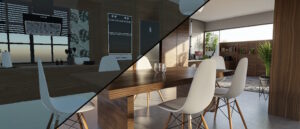
In this release we are also introducing, as an experimental feature, a brand new AI Rendering option inside Evergine Studio. Once a scene or CAD model has been loaded and the camera positioned at the desired angle, the input frame coming from the viewer can be captured and processed locally by an AI model (FLUX.2-klein) running on either CPU or GPU, producing a photorealistic result that enhances materials and lighting and makes it possible to generate final render images directly from the editor. Something that with a traditional rendering pipeline could take hours can now be executed locally in just a few seconds.
The integration also exposes the default prompt to the user, so it can be freely edited to simulate different times of the day that transform the lighting of the scene, or to swap materials in order to adapt the look and feel of the result to what each project needs. This gives technical teams a flexible way to iterate on visual variations without ever leaving Evergine Studio.
By bringing this workflow directly inside the editor, we want to streamline the day-to-day of teams working in sectors such as architecture, industrial design, automotive, product design and real estate visualization, where producing high quality renders quickly is a critical part of the design and validation process.
These technologies are evolving extremely fast, and the Evergine team is committed to bringing them to our users as soon as they are mature enough to make a real difference in their daily workflows.
.NET 10 support
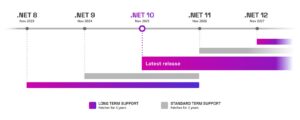
The .NET ecosystem keeps moving fast, and we always aim to provide the recommended APIs and the most up-to-date runtime for our developers, .NET 8, the previous LTS, will reach end of support in November 2026. Staying on the latest stable, long-term supported version of .NET is therefore the right move for any team building professional applications today.
With this release, we have migrated the entire Evergine project, including the engine itself, all internal tools and the official templates, to .NET 10. This ensures that every new project created from the Evergine Launcher targets the latest LTS version of .NET out of the box, with no manual configuration required.
The migration unlocks several immediate benefits for our users. Developers can now take advantage of C# 14 and the new language features it introduces, alongside the runtime performance improvements that come with .NET 10, including better JIT and AOT code generation, GC enhancements and reduced startup times. The whole toolchain is also fully aligned with Visual Studio 2026, providing a smoother experience when debugging, profiling and deploying Evergine applications.
.NET 10 will have official support until November 2028, so if you are starting a new project today, this is the recommended version to build it on top of Evergine.
Gaussian Splatting new features

Gaussian Splatting has become one of the most exciting techniques for real-time reality capture, going far beyond what was achievable with traditional photogrammetry by producing photorealistic 3D scenes with view-dependent lighting and a level of visual fidelity that classic photogrammetric meshes cannot reach. In this release we continue pushing the Gaussian Splatting add-on forward, with two major capabilities that increase its versatility and prepare it for the next generation of rendering pipelines: native support for the SOG compressed format, and a brand-new WebGPU rendering backend that brings modern, explicit GPU control to the web platform and unlocks compute shaders, significantly improving Gaussian Splatting rendering performance in the browser compared to the previous WebGL-based approach.
The new SOG format takes a clever approach: it lays out all the data describing a Gaussian Splatting scene (positions, colors, transparency and the Spherical Harmonics that encode view-dependent lighting) as regular 2D images, so that standard image compression can be applied to the entire dataset. The key advantage over the existing compressed .ply format is that SOG also compresses the Spherical Harmonic coefficients, which were not handled by compressed .ply and typically dominate the total file size of high-quality captures. The result is dramatic: SOG achieves size reductions of 19.9x to 39.5x over the original 3DGS format, and around 5x over compressed .ply, while preserving visual quality. In real scenes, this translates into roughly 80% storage savings compared to the already-compressed .ply baseline.
For a more detailed description of both features, visit: https://evergine.com/gaussian-splatting-new-features/
IA Asset Generation Upgraded
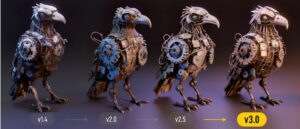
Since we first introduced AI-driven asset generation in Evergine Studio in late 2024, we have continued to evolve this feature in close alignment with the Tripo AI platform that powers it. Each release has brought new model versions, higher visual quality and more flexibility for our users to generate 3D assets directly inside the editor.
In this release we have updated the model catalog available in Evergine Studio to reflect the latest Tripo generations. We have removed the older v1.4 and v2.0 model versions, which had been deprecated by the platform, and added support for the new v3.0 and v3.1 models. The v3.0 generation brings significantly cleaner geometry and an Ultra mode capable of producing assets with up to 2 million polygons, while v3.1 builds on that foundation as an HD model focused on richer detail, stronger geometry precision and more production-ready output.
The previous version did not expose any way to choose the Tripo model from the editor. In this release we have added a new version selector in the Asset Generation UI that lets users pick between v2.5, v3.0 and v3.1 for each generation, with v2.5 selected by default.
Changing to Reverse-Z
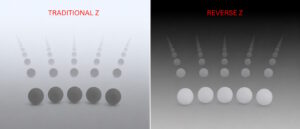
The depth buffer is one of the most fundamental pieces in any real-time graphics engine. Every time the engine draws an object, it stores the distance from that pixel to the camera in a buffer, and uses that information to decide which surface is visible at each pixel. Evergine has always used this technique to resolve visibility, but the traditional approach distributes depth precision unevenly across the scene. As a result, two surfaces that are very close together (typical in CAD models with thousands of small pieces, layered components or coplanar faces) can map to the same numerical value once normalized, producing the well-known z-fighting artifacts that become more severe as the distance from the camera grows.
In this release we have introduced Reverse Z-Buffering across the engine. The technique is remarkably robust: the choice of near and far planes no longer requires fine tuning, and the far plane can even be set to infinity. This is a major enabler for applications that need to handle huge worlds, such as the new Cesium add-on rendering the entire Earth, while still keeping accurate depth resolution for small or nearby elements. CAD viewers, BIM applications, digital twins and any scenario that combines very small details with large overall extents benefit immediately from this change.
For a deeper technical explanation of the mathematics behind this change and how to take advantage of it, visit: https://evergine.com/changing-to-reverse-z/
Adding TextureView graphics resource
In previous versions of Evergine, the low-level Texture object encapsulated both the texture data itself and the way that data was meant to be read by the GPU. This single-object approach was simple and versatile, and worked well for most common scenarios. However, in more advanced use cases, such as reusing the same underlying texture data under different formats, dimensions or sub-resources, this design forced the engine to perform additional copies, introducing unnecessary memory and bandwidth overhead.
To address this, in this release we have introduced the new TextureView graphics resource as a first-class concept alongside Texture. A TextureView describes how a given Texture should be interpreted by the GPU without duplicating its underlying data, enabling advanced rendering techniques to be implemented in a more memory-efficient way. The API has been designed with full backward compatibility in mind: every method that previously accepted a Texture now also accepts a TextureView, so existing projects continue to work without changes, while developers building more advanced systems can start taking advantage of the new resource where it makes sense.
For a detailed description of the new TextureView resource and how to use it in advanced rendering scenarios, visit: https://evergine.com/textureview-graphics-resource/
New Evergine Studio viewer strategy
Evergine Studio is currently built on top of WPF, a UI technology whose compositor was originally designed around DirectX 9 interop and can only natively integrate textures from that generation. To display the 3D viewers of the editor on top of a modern graphics backend, Evergine Studio had to copy the render target into an intermediate DirectX surface compatible with the WPF compositor on every frame. This extra copy is inefficient and ends up limiting the framerate of the viewers, which becomes especially noticeable in scenes with many visual elements.
In this release we have changed how the 3D viewers are rendered inside Evergine Studio in order to remove this bottleneck. Instead of going through the WPF compositor, the new strategy takes the Win32 HWND of the host control directly, computes the exact rectangle where the viewer should be drawn, and hands that pointer to the renderer so that the GPU can draw straight into that screen area. This approach steps outside of the regular WPF composition model, but in exchange it provides a noticeable performance improvement, particularly in projects with many visual elements where the cost of the previous texture-copy path was the most visible.
The new viewer rendering strategy is enabled by default for all users. In case any compatibility issue is detected with a specific scene or workflow, it can be disabled from Settings > Preferences by unchecking the “Use new viewer rendering control” option, which falls back to the previous WPF-compositor-based rendering path.
DirectX 12 Performance improvements
DirectX 12 will soon become the default graphics API in Evergine, replacing DirectX 11. In preparation for that transition, we have invested significant effort in this release to stabilize the DirectX 12 backend and bring its performance up to the level required for it to take over as the recommended path on Windows.
The most relevant change is a redesign of how the engine handles root signatures and descriptors. Evergine previously relied on a single global root signature shared across all pipelines. The backend has now moved to a per-pipeline root signature strategy, which allows the engine to size each signature exactly to the needs of the specific shader being executed. In addition, resource descriptors are now pre-allocated in CPU descriptor heaps and uploaded to the GPU descriptor heaps in an efficient batched fashion. Together, these two changes reduce the CPU to GPU bandwidth required per frame and adapt much better to scenes of very different sizes, resulting in a noticeable performance improvement across the board.
Alongside the DirectX 12 backend improvements, we have also updated both the DirectX 12 and Vulkan low-level APIs to their latest versions, improving resource management and performance on both. This keeps Evergine’s modern graphics backends aligned with the latest capabilities exposed by Microsoft and Khronos, and lays the groundwork for further GPU-driven rendering work in upcoming releases.
Future work
The future of Evergine has never looked more exciting. Evergine is a constantly evolving platform, and every release is one more step in our long-term goal of providing the most powerful and accessible engine for industrial 3D applications built on .NET. Looking ahead, we want to share the main lines of work that the team is investing in for the next major release, planned for November 2026.
On the graphics side, one of the most important milestones of the next release will be making DirectX 12 the default backend in Evergine Studio, taking advantage of all the stabilization and performance work delivered in this release. In parallel, we are designing a new extensible rendering pipeline that will allow developers to plug in custom rendering stages in a much more flexible way, unlocking advanced techniques on top of the modern graphics APIs we already support.
We are also working on a new Job System designed to extract the maximum performance from the new generation of desktop processors, which already ship with very high core counts. In this area we are also collaborating with companies like Intel to ensure that Evergine takes full advantage of the upcoming processors that will arrive on the market with massive core counts, scaling the performance of large scenes and complex simulations directly with the hardware available.
Beyond the engine itself, we are also exploring how to bring Evergine closer to the new generation of AI-powered development workflows. We are working on a new Evergine CLI designed to be driven by AI agents and exposed through skills inside AI plugins, so it can be used from the most popular AI development tools available today. The goal is to allow developers to create, configure and iterate on Evergine projects directly from their preferred AI assistant, dramatically reducing the time it takes to go from an idea to a working 3D experience.
Thank you for being part of this journey. Every project built on Evergine, every piece of feedback you share, every new use case our community pushes the engine into, helps us shape what the platform becomes next. We could not be more excited about the road ahead, and we cannot wait to put the next release in your hands.
We hope you enjoy this new release!
Javier Cantón

